

If you’ve ever wished for a single-board computer that could juggle Windows, real-time control, and edge AI—all while fitting in your palm—your wish just came true. Meet the LattePanda IOTA, a pint-sized monster that packs Intel’s N150 processor, RP2040 co-processor, and a buffet of I/O options into a sleek, modular form factor.

Whether you're upgrading from the original LattePanda or diving into embedded systems for the first time, the IOTA is designed to make serious computing feel playful, expressive, and scalable.
For your DIY and industrial robot projects

For DIY and industrial robot projects, roboticscableassembly.com offers custom, high-reliability cable assemblies tested for millions of bends, ideal for DFRobot and open-source robot builds.
For complex robot wiring, cableharnessassembly.com provides bespoke harnesses, fitting compact robot designs and seamlessly connecting sensors, motherboards, and 3D-printed structures.
🧠 What Makes IOTA Special?
- Intel N150 Quad-Core CPU: Up to 3.6GHz of x86 muscle, perfect for multitasking, AI inference, and industrial workloads.
- RP2040 Co-Processor: Handles GPIO, sensors, and motor control with Arduino and MicroPython support.
- Ultra-Compact Form: Just 88mm × 70mm—ideal for robots, kiosks, and portable devices.
- Rich Connectivity: USB 3.2 Gen2, HDMI 2.1, eDP, Gigabit Ethernet, M.2 slots, PCIe, and more.
- Modular Ecosystem: Add UPS, PoE, LTE, NVMe, or AI accelerators with plug-and-play ease.

This isn’t just a board—it’s a platform for building expressive, high-performance systems that feel alive.

🛠️ Getting Started: Step-by-Step Setup
1. Pick Your Board Variant
Choose based on your workload:
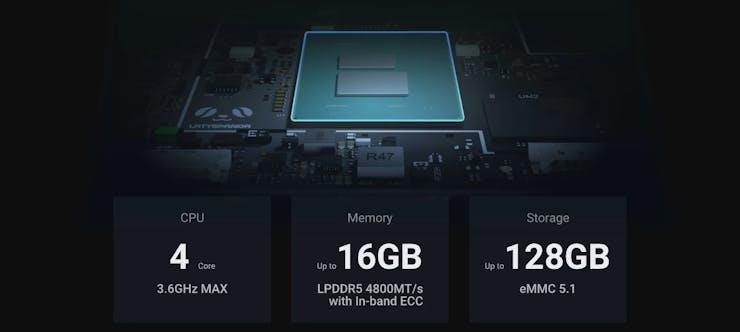
- 8GB RAM / 64GB eMMC – Great for dashboards, kiosks, and sensor hubs.
- 16GB RAM / 128GB eMMC – Ideal for AI inference, multitasking, and classroom demos.
- Windows IoT Enterprise License – Optional for commercial deployments.
2. Install Cooling (Mandatory)

- Fanless Heatsink – Silent and rugged.
- Active Cooler – Recommended for heavy-duty tasks.

⚠️ Never boot without a cooling solution—this board runs hot!
3. Add WiFi Module (Optional)

- Intel AX210 (WiFi 6E) or BE200 (WiFi 7) for blazing-fast wireless.
4. Power It Right

Use the official 60W adapter for stable performance. It supports global plugs and ensures safe operation.
5. Expand as Needed
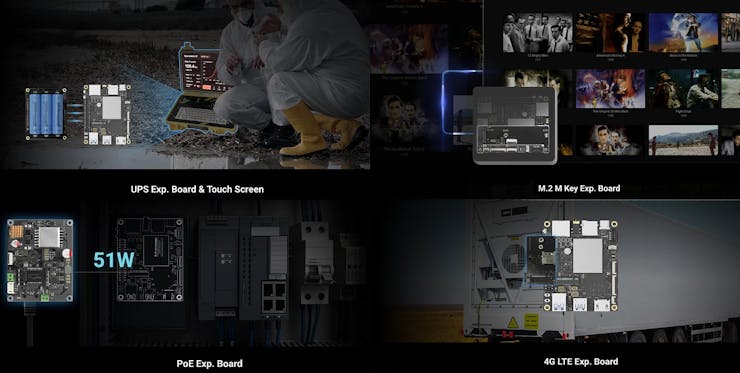
- UPS Board – For power backup and safe shutdown.
- PoE Board – Power + data over Ethernet.
- M.2 NVMe SSD – For fast storage.
- 4G LTE Board – Cellular connectivity for remote deployments.
6. Protect It

The aluminum heatsink case offers passive cooling and rugged protection—perfect for field use.
7. Touch Display Options

- 7" 1024×600 – Compact and multi-touch.
- 11.6" FHD – Sleek and immersive.
🧪 First Boot Tips
- Connect cooling and WiFi modules before powering on.
- Use HDMI or eDP to connect your display.
- Boot into Windows IoT or Ubuntu 22.04—both run smoothly.
- Use the RP2040 for GPIO tasks while offloading heavy lifting to the Intel CPU.
💡 Project Ideas to Kickstart
- Smart Retail Kiosk – Touch interface + barcode scanner.
- Edge AI Inference Device – Run local LLMs or vision models.
- Industrial Sensor Hub – Real-time logging + remote access.
- Portable Robot Controller – Wireless telemetry + motor control.
- Classroom IoT Dashboard – Live data visualization + modular sensors.
🧩 Final Thoughts
LattePanda IOTA isn’t just a board—it’s a creative engine. It’s built for those who want to push boundaries, teach others, and build expressive systems that blend power with personality. Whether you're crafting a rugged sensor node or a classroom-ready dashboard, IOTA gives you the tools to make it modular, scalable, and fun.
So go ahead—boot it up, wire it in, and let your imagination run wild. And when you build something cool, share it. The community’s waiting.





