
I wanted a smart motion detector that didn't just blink an LED — I wanted data. Who moved, when, how often, and what's the threat level right now? The result is SENTINEL: an ESP32-powered PIR motion detector with a full cyberpunk-style web dashboard you can open on any phone or laptop on your local network. No cloud. No subscription. Pure local intelligence.

And to make it look like a proper product instead of a breadboard mess, I got the enclosure custom 3D printed by JUSTWAY 3D Print — and it came out absolutely perfect.
What You'll Build
- 1. A WiFi-connected ESP32 motion detector
- 2. A live web dashboard with animated motion status, 24-hour bar charts, activity heatmaps, threat level assessment, event logs, and real-time polling
- 3. A clean, professional 3D printed enclosure housing everything neatly
Software:
1. Arduino IDE 2.x
- 2. ESP32 board package by Espressif
- 3. Libraries: WiFi, WebServer, NTPClient, WiFiUdp (all included with ESP32 package)
Step 1 — Setting Up Arduino IDE
If you've never used ESP32 with Arduino before, follow this exactly.
1.1 — Install Arduino IDEDownload from arduino.cc/en/software. Use version 2.x.
1.2 — Add ESP32 Board Package
- Open Arduino IDE
- Go to File → Preferences
- Find Additional Board Manager URLs and paste:
https://raw.githubusercontent.com/espressif/arduino-esp32/gh-pages/package_esp32_index.json

- Go to Tools → Board → Board Manager
- Search esp32
- Install esp32 by Espressif Systems (v3.x recommended)

- This downloads ~300MB — give it time
1.3 — Select Your Board
- Tools → Board → ESP32 Arduino → ESP32 Dev Module
- Tools → Upload Speed → 115200
- Tools → Port → COMx (whichever port your ESP32 appears on)
#include <WiFi.h>
#include <WebServer.h>
#include <WiFiUdp.h>
#include <NTPClient.h>
// ---------- Configuration ----------
const char* ssid = "";
const char* password = "";
IPAddress local_IP(192, 168, 1, 11);
IPAddress gateway(192, 168, 1, 1);
IPAddress subnet(255, 255, 255, 0);
IPAddress primaryDNS(8, 8, 8, 8);
IPAddress secondaryDNS(8, 8, 4, 4);
// Pins
const int PIR_SENSOR_OUTPUT_PIN = 32;
const int LED_PIN = 2;
// Motion tracking
bool motionState = false;
int motionCount = 0;
#define HISTORY_SIZE 10
String motionHistory[HISTORY_SIZE];
int historyIndex = 0;
String lastMotionTime = "None";
unsigned long lastMotionMillis = 0;
const unsigned long MOTION_DEBOUNCE_MS = 2000;
// Hourly motion tracking
int hourlyMotion[24] = {0};
int currentHour = -1;
// Per-minute tracking (last 60 minutes)
int minuteMotion[60] = {0};
int currentMinute = -1;
// Session stats
unsigned long totalMotionDuration = 0;
unsigned long motionStartMillis = 0;
int peakHour = 0;
int peakHourCount = 0;
// Server & time
WebServer server(80);
WiFiUDP ntpUDP;
NTPClient timeClient(ntpUDP, "pool.ntp.org", 19800, 1000);
unsigned long bootMillis = 0;
// ---------- Helper functions ----------
String buildHistoryJSON() {
String json = "[";
bool first = true;
for (int i = 0; i < HISTORY_SIZE; i++) {
int idx = (historyIndex - 1 - i + HISTORY_SIZE) % HISTORY_SIZE;
if (motionHistory[idx] != "") {
if (!first) json += ",";
json += "\"" + motionHistory[idx] + "\"";
first = false;
}
}
json += "]";
return json;
}
String getSignalQualityPercent() {
int rssi = WiFi.RSSI();
int quality = map(rssi, -100, -50, 0, 100);
quality = constrain(quality, 0, 100);
return String(quality);
}
int getRSSI() {
return WiFi.RSSI();
}
// ---------- HTTP handlers ----------
void handleRoot() {
String html = R"rawliteral(<!DOCTYPE html>
<html lang="en">
<head>
<meta charset="utf-8">
<meta name="viewport" content="width=device-width, initial-scale=1">
<title>SENTINEL // Motion Intelligence System</title>
<link href="https://fonts.googleapis.com/css2?family=Share+Tech+Mono&family=Orbitron:wght@400;700;900&family=Rajdhani:wght@300;400;600;700&display=swap" rel="stylesheet">
<script src="https://cdn.jsdelivr.net/npm/chart.js"></script>
<style>
:root {
--bg: #020408;
--bg2: #050c12;
--panel: rgba(0,255,200,0.03);
--border: rgba(0,255,180,0.15);
--border2: rgba(0,255,180,0.35);
--cyan: #00ffc8;
--cyan2: #00c8ff;
--red: #ff2255;
--orange: #ff8c00;
--yellow: #ffe000;
--green: #00ff88;
--text: #c8fff4;
--muted: #3a6060;
--mono: 'Share Tech Mono', monospace;
--display: 'Orbitron', sans-serif;
--body: 'Rajdhani', sans-serif;
}
*, *::before, *::after { box-sizing: border-box; margin: 0; padding: 0; }
body {
background: var(--bg);
color: var(--text);
font-family: var(--body);
min-height: 100vh;
overflow-x: hidden;
}
/* Animated scanline overlay */
body::before {
content: '';
position: fixed;
inset: 0;
background: repeating-linear-gradient(
0deg,
transparent,
transparent 2px,
rgba(0,255,180,0.015) 2px,
rgba(0,255,180,0.015) 4px
);
pointer-events: none;
z-index: 9999;
animation: scanMove 8s linear infinite;
}
@keyframes scanMove {
0% { background-position: 0 0; }
100% { background-position: 0 200px; }
}
/* Moving scan line */
body::after {
content: '';
position: fixed;
left: 0; right: 0;
height: 2px;
background: linear-gradient(90deg, transparent, var(--cyan), transparent);
opacity: 0.4;
z-index: 10000;
animation: scanLine 6s ease-in-out infinite;
pointer-events: none;
}
@keyframes scanLine {
0% { top: -2px; opacity: 0; }
10% { opacity: 0.4; }
90% { opacity: 0.4; }
100% { top: 100vh; opacity: 0; }
}
/* Grid background */
.grid-bg {
position: fixed;
inset: 0;
background-image:
linear-gradient(rgba(0,255,180,0.03) 1px, transparent 1px),
linear-gradient(90deg, rgba(0,255,180,0.03) 1px, transparent 1px);
background-size: 40px 40px;
z-index: 0;
}
.app {
position: relative;
z-index: 1;
max-width: 1400px;
margin: 0 auto;
padding: 20px;
}
/* ---- HEADER ---- */
.header {
display: flex;
justify-content: space-between;
align-items: center;
padding: 20px 30px;
border: 1px solid var(--border2);
background: var(--panel);
backdrop-filter: blur(10px);
margin-bottom: 20px;
position: relative;
clip-path: polygon(0 0, calc(100% - 30px) 0, 100% 30px, 100% 100%, 30px 100%, 0 calc(100% - 30px));
}
.header::before {
content: '';
position: absolute;
inset: 0;
background: linear-gradient(135deg, rgba(0,255,200,0.05) 0%, transparent 50%);
pointer-events: none;
}
.logo {
font-family: var(--display);
font-size: 1.8rem;
font-weight: 900;
letter-spacing: 4px;
color: var(--cyan);
text-shadow: 0 0 20px rgba(0,255,200,0.5), 0 0 60px rgba(0,255,200,0.2);
animation: logoGlow 3s ease-in-out infinite alternate;
}
@keyframes logoGlow {
from { text-shadow: 0 0 20px rgba(0,255,200,0.5), 0 0 40px rgba(0,255,200,0.2); }
to { text-shadow: 0 0 30px rgba(0,255,200,0.8), 0 0 80px rgba(0,255,200,0.4), 0 0 120px rgba(0,255,200,0.1); }
}
.logo span { color: var(--red); }
.header-right {
text-align: right;
font-family: var(--mono);
font-size: 0.75rem;
color: var(--muted);
line-height: 1.8;
}
.header-time {
font-family: var(--display);
font-size: 1.4rem;
color: var(--cyan);
letter-spacing: 2px;
}
/* ---- STATUS BAR ---- */
.status-bar {
display: flex;
gap: 10px;
margin-bottom: 20px;
flex-wrap: wrap;
}
.status-pill {
display: flex;
align-items: center;
gap: 8px;
padding: 6px 14px;
border: 1px solid var(--border);
background: var(--panel);
font-family: var(--mono);
font-size: 0.7rem;
color: var(--muted);
letter-spacing: 1px;
text-transform: uppercase;
}
.status-pill .dot {
width: 6px;
height: 6px;
border-radius: 50%;
background: var(--green);
box-shadow: 0 0 6px var(--green);
animation: blink 2s ease-in-out infinite;
}
.status-pill .dot.red { background: var(--red); box-shadow: 0 0 6px var(--red); }
@keyframes blink {
0%, 100% { opacity: 1; }
50% { opacity: 0.3; }
}
/* ---- MAIN GRID ---- */
.main-grid {
display: grid;
grid-template-columns: 1fr 1fr 1fr;
grid-template-rows: auto;
gap: 16px;
}
/* ---- MOTION HERO ---- */
.motion-hero {
grid-column: 1 / 3;
grid-row: 1;
}
/* ---- PANEL BASE ---- */
.panel {
border: 1px solid var(--border);
background: var(--panel);
backdrop-filter: blur(8px);
padding: 24px;
position: relative;
transition: border-color 0.3s, box-shadow 0.3s;
}
.panel:hover {
border-color: var(--border2);
box-shadow: 0 0 30px rgba(0,255,180,0.05), inset 0 0 30px rgba(0,255,180,0.02);
}
.panel-corner {
position: absolute;
width: 12px;
height: 12px;
border-color: var(--cyan2);
border-style: solid;
}
.panel-corner.tl { top: -1px; left: -1px; border-width: 2px 0 0 2px; }
.panel-corner.tr { top: -1px; right: -1px; border-width: 2px 2px 0 0; }
.panel-corner.bl { bottom: -1px; left: -1px; border-width: 0 0 2px 2px; }
.panel-corner.br { bottom: -1px; right: -1px; border-width: 0 2px 2px 0; }
.panel-label {
font-family: var(--mono);
font-size: 0.65rem;
color: var(--muted);
letter-spacing: 3px;
text-transform: uppercase;
margin-bottom: 16px;
display: flex;
align-items: center;
gap: 10px;
}
.panel-label::after {
content: '';
flex: 1;
height: 1px;
background: linear-gradient(90deg, var(--border), transparent);
}
/* ---- BIG MOTION STATUS ---- */
.motion-status-wrap {
display: flex;
align-items: center;
gap: 30px;
}
.motion-orb {
width: 120px;
height: 120px;
border-radius: 50%;
position: relative;
flex-shrink: 0;
display: flex;
align-items: center;
justify-content: center;
border: 2px solid var(--green);
box-shadow: 0 0 30px rgba(0,255,136,0.3), inset 0 0 30px rgba(0,255,136,0.1);
transition: all 0.5s ease;
}
.motion-orb.active {
border-color: var(--red);
box-shadow: 0 0 50px rgba(255,34,85,0.5), inset 0 0 40px rgba(255,34,85,0.2);
animation: orbPulse 0.5s ease-in-out infinite alternate;
}
@keyframes orbPulse {
from { box-shadow: 0 0 30px rgba(255,34,85,0.4), inset 0 0 20px rgba(255,34,85,0.15); }
to { box-shadow: 0 0 70px rgba(255,34,85,0.8), inset 0 0 50px rgba(255,34,85,0.3); }
}
.motion-orb-ring {
position: absolute;
inset: -8px;
border-radius: 50%;
border: 1px solid rgba(0,255,136,0.3);
animation: ringExpand 2s ease-out infinite;
}
.motion-orb-ring.r2 { inset: -16px; animation-delay: 0.5s; }
.motion-orb-ring.r3 { inset: -24px; animation-delay: 1s; }
@keyframes ringExpand {
0% { opacity: 0.6; transform: scale(0.95); }
100% { opacity: 0; transform: scale(1.15); }
}
.orb-icon {
font-size: 2.5rem;
transition: all 0.3s;
}
.motion-info { flex: 1; }
.motion-state-text {
font-family: var(--display);
font-size: 2rem;
font-weight: 700;
letter-spacing: 3px;
color: var(--green);
margin-bottom: 8px;
transition: color 0.3s;
}
.motion-state-text.active { color: var(--red); }
.motion-meta {
font-family: var(--mono);
font-size: 0.75rem;
color: var(--muted);
line-height: 2;
}
.motion-meta span { color: var(--cyan); }
/* ---- STAT CARDS ---- */
.stat-card {
display: flex;
flex-direction: column;
justify-content: space-between;
padding: 20px;
border: 1px solid var(--border);
background: var(--panel);
position: relative;
overflow: hidden;
transition: all 0.3s;
}
.stat-card:hover { border-color: var(--border2); }
.stat-card::before {
content: '';
position: absolute;
bottom: 0; left: 0; right: 0;
height: 2px;
background: linear-gradient(90deg, transparent, var(--cyan), transparent);
transform: scaleX(0);
transition: transform 0.4s;
}
.stat-card:hover::before { transform: scaleX(1); }
.stat-label {
font-family: var(--mono);
font-size: 0.6rem;
color: var(--muted);
letter-spacing: 2px;
text-transform: uppercase;
margin-bottom: 10px;
}
.stat-value {
font-family: var(--display);
font-size: 2.4rem;
font-weight: 700;
color: var(--cyan);
line-height: 1;
text-shadow: 0 0 20px rgba(0,255,200,0.3);
}
.stat-value.red { color: var(--red); text-shadow: 0 0 20px rgba(255,34,85,0.3); }
.stat-value.orange { color: var(--orange); text-shadow: 0 0 20px rgba(255,140,0,0.3); }
.stat-value.green { color: var(--green); text-shadow: 0 0 20px rgba(0,255,136,0.3); }
.stat-sub {
font-family: var(--mono);
font-size: 0.65rem;
color: var(--muted);
margin-top: 6px;
}
.stat-icon {
position: absolute;
right: 16px;
top: 16px;
font-size: 1.8rem;
opacity: 0.15;
}
/* ---- SIGNAL GAUGE ---- */
.signal-gauge {
position: relative;
margin: 10px 0;
}
.gauge-track {
height: 6px;
background: rgba(255,255,255,0.05);
border: 1px solid var(--border);
overflow: hidden;
}
.gauge-fill {
height: 100%;
background: linear-gradient(90deg, var(--red), var(--orange), var(--yellow), var(--green));
transition: width 1s ease;
position: relative;
}
.gauge-fill::after {
content: '';
position: absolute;
right: 0; top: 0; bottom: 0;
width: 4px;
background: white;
box-shadow: 0 0 8px white;
animation: gaugeBlip 1s ease-in-out infinite alternate;
}
@keyframes gaugeBlip { from { opacity: 1; } to { opacity: 0.3; } }
/* ---- CHART PANELS ---- */
.chart-wrap {
position: relative;
height: 180px;
margin-top: 10px;
}
.chart-wrap-tall {
position: relative;
height: 220px;
margin-top: 10px;
}
/* ---- HISTORY LIST ---- */
.event-list {
list-style: none;
margin-top: 8px;
}
.event-item {
display: flex;
align-items: center;
gap: 12px;
padding: 8px 0;
border-bottom: 1px solid rgba(0,255,180,0.05);
font-family: var(--mono);
font-size: 0.72rem;
color: var(--muted);
animation: fadeIn 0.4s ease;
}
@keyframes fadeIn { from { opacity: 0; transform: translateX(-10px); } to { opacity: 1; transform: translateX(0); } }
.event-item:first-child { color: var(--cyan); }
.event-num {
font-family: var(--display);
font-size: 0.6rem;
color: var(--border2);
min-width: 20px;
}
.event-dot {
width: 4px;
height: 4px;
border-radius: 50%;
background: var(--cyan);
box-shadow: 0 0 4px var(--cyan);
flex-shrink: 0;
}
.event-item:first-child .event-dot { background: var(--red); box-shadow: 0 0 6px var(--red); }
/* ---- HEATMAP ---- */
.heatmap {
display: grid;
grid-template-columns: repeat(24, 1fr);
gap: 3px;
margin-top: 10px;
}
.heatmap-cell {
height: 40px;
background: rgba(0,255,180,0.05);
border: 1px solid var(--border);
transition: all 0.5s ease;
position: relative;
cursor: default;
}
.heatmap-cell:hover::after {
content: attr(data-label);
position: absolute;
bottom: 100%;
left: 50%;
transform: translateX(-50%);
background: #000;
border: 1px solid var(--border2);
padding: 2px 6px;
font-family: var(--mono);
font-size: 0.6rem;
color: var(--cyan);
white-space: nowrap;
z-index: 10;
}
.heatmap-labels {
display: grid;
grid-template-columns: repeat(24, 1fr);
gap: 3px;
margin-top: 4px;
}
.heatmap-label {
text-align: center;
font-family: var(--mono);
font-size: 0.5rem;
color: var(--muted);
}
/* ---- THREAT LEVEL ---- */
.threat-display {
text-align: center;
padding: 20px 0;
}
.threat-label {
font-family: var(--mono);
font-size: 0.6rem;
color: var(--muted);
letter-spacing: 3px;
margin-bottom: 10px;
}
.threat-value {
font-family: var(--display);
font-size: 3rem;
font-weight: 900;
letter-spacing: 4px;
margin-bottom: 6px;
}
.threat-value.low { color: var(--green); text-shadow: 0 0 30px rgba(0,255,136,0.5); }
.threat-value.medium { color: var(--yellow); text-shadow: 0 0 30px rgba(255,224,0,0.5); }
.threat-value.high { color: var(--orange); text-shadow: 0 0 30px rgba(255,140,0,0.5); }
.threat-value.critical { color: var(--red); text-shadow: 0 0 30px rgba(255,34,85,0.7); animation: criticalFlash 0.5s ease infinite alternate; }
@keyframes criticalFlash { from { opacity: 1; } to { opacity: 0.5; } }
.threat-bar {
height: 4px;
background: rgba(255,255,255,0.05);
margin: 8px 0;
overflow: hidden;
}
.threat-bar-fill { height: 100%; transition: all 1s ease; }
/* ---- CONTROLS ---- */
.controls { display: flex; gap: 10px; margin-top: 16px; flex-wrap: wrap; }
.btn {
font-family: var(--mono);
font-size: 0.65rem;
letter-spacing: 2px;
text-transform: uppercase;
padding: 10px 18px;
border: 1px solid var(--border2);
background: transparent;
color: var(--cyan);
cursor: pointer;
transition: all 0.3s;
position: relative;
overflow: hidden;
}
.btn::before {
content: '';
position: absolute;
inset: 0;
background: var(--cyan);
transform: scaleX(0);
transform-origin: left;
transition: transform 0.3s;
z-index: -1;
}
.btn:hover::before { transform: scaleX(1); }
.btn:hover { color: var(--bg); }
.btn.red { border-color: var(--red); color: var(--red); }
.btn.red::before { background: var(--red); }
.btn.red:hover { color: var(--bg); }
/* ---- BOTTOM GRID ---- */
.bottom-grid {
display: grid;
grid-template-columns: 1fr 1fr 1fr;
gap: 16px;
margin-top: 16px;
}
/* ---- NETWORK INFO ---- */
.info-row {
display: flex;
justify-content: space-between;
padding: 8px 0;
border-bottom: 1px solid rgba(0,255,180,0.05);
font-family: var(--mono);
font-size: 0.7rem;
}
.info-key { color: var(--muted); }
.info-val { color: var(--cyan); text-align: right; }
/* ---- SCROLLBAR ---- */
::-webkit-scrollbar { width: 4px; }
::-webkit-scrollbar-track { background: var(--bg); }
::-webkit-scrollbar-thumb { background: var(--border2); }
/* ---- RESPONSIVE ---- */
@media (max-width: 900px) {
.main-grid { grid-template-columns: 1fr 1fr; }
.motion-hero { grid-column: 1 / 3; }
.bottom-grid { grid-template-columns: 1fr 1fr; }
.heatmap { grid-template-columns: repeat(12, 1fr); }
.heatmap-labels { grid-template-columns: repeat(12, 1fr); }
}
@media (max-width: 600px) {
.main-grid { grid-template-columns: 1fr; }
.motion-hero { grid-column: 1; }
.bottom-grid { grid-template-columns: 1fr; }
.motion-status-wrap { flex-direction: column; text-align: center; }
.heatmap { grid-template-columns: repeat(8, 1fr); }
.heatmap-labels { display: none; }
.logo { font-size: 1.2rem; }
}
</style>
</head>
<body>
<div class="grid-bg"></div>
<div class="app">
<!-- HEADER -->
<header class="header">
<div>
<div class="logo">SENTINEL<span>//</span>PIR</div>
<div style="font-family:var(--mono);font-size:0.6rem;color:var(--muted);margin-top:4px;letter-spacing:2px;">MOTION INTELLIGENCE SYSTEM v3.0</div>
</div>
<div class="header-right">
<div class="header-time" id="clock">--:--:--</div>
<div id="dateStr">LOADING...</div>
<div id="ipStr">IP: ---.---.---.---</div>
</div>
</header>
<!-- STATUS BAR -->
<div class="status-bar">
<div class="status-pill"><div class="dot" id="wifiDot"></div><span id="wifiStatus">WIFI CONNECTING</span></div>
<div class="status-pill"><div class="dot" id="pirDot"></div><span>PIR ACTIVE</span></div>
<div class="status-pill"><div class="dot" id="ntpDot"></div><span>NTP SYNCED</span></div>
<div class="status-pill" style="margin-left:auto;"><span id="uptimeStr">UPTIME: --</span></div>
<div class="status-pill"><span id="pollStatus">POLLING: LIVE</span></div>
</div>
<!-- MAIN GRID -->
<div class="main-grid">
<!-- MOTION HERO -->
<div class="panel motion-hero" id="heroPanel">
<div class="panel-corner tl"></div><div class="panel-corner tr"></div>
<div class="panel-corner bl"></div><div class="panel-corner br"></div>
<div class="panel-label">// MOTION SENSOR STATUS</div>
<div class="motion-status-wrap">
<div class="motion-orb" id="motionOrb">
<div class="motion-orb-ring"></div>
<div class="motion-orb-ring r2"></div>
<div class="motion-orb-ring r3"></div>
<div class="orb-icon" id="orbIcon">🟢</div>
</div>
<div class="motion-info">
<div class="motion-state-text" id="motionStateText">CLEAR</div>
<div class="motion-meta">
LAST DETECTED • <span id="lastMotion">NONE</span><br>
TOTAL EVENTS • <span id="motionCount">0</span><br>
SESSION STARTED • <span id="sessionStart">--:--:--</span><br>
PIR PIN • <span>GPIO 32</span>
</div>
</div>
</div>
</div>
<!-- THREAT LEVEL -->
<div class="panel" id="threatPanel">
<div class="panel-corner tl"></div><div class="panel-corner tr"></div>
<div class="panel-corner bl"></div><div class="panel-corner br"></div>
<div class="panel-label">// THREAT LEVEL</div>
<div class="threat-display">
<div class="threat-label">CURRENT ASSESSMENT</div>
<div class="threat-value low" id="threatValue">LOW</div>
<div class="threat-bar"><div class="threat-bar-fill" id="threatFill" style="width:10%;background:var(--green);"></div></div>
<div style="font-family:var(--mono);font-size:0.6rem;color:var(--muted);margin-top:8px;" id="threatDesc">No significant activity</div>
</div>
</div>
<!-- STAT: COUNT -->
<div class="stat-card panel">
<div class="panel-corner tl"></div><div class="panel-corner tr"></div>
<div class="panel-corner bl"></div><div class="panel-corner br"></div>
<div class="stat-icon">📡</div>
<div class="stat-label">// TOTAL DETECTIONS</div>
<div class="stat-value red" id="statCount">0</div>
<div class="stat-sub">events this session</div>
</div>
<!-- STAT: SIGNAL -->
<div class="stat-card panel">
<div class="panel-corner tl"></div><div class="panel-corner tr"></div>
<div class="panel-corner bl"></div><div class="panel-corner br"></div>
<div class="stat-icon">📶</div>
<div class="stat-label">// WIFI SIGNAL</div>
<div class="stat-value orange" id="statSignal">--</div>
<div class="signal-gauge"><div class="gauge-track"><div class="gauge-fill" id="gaugeFill" style="width:0%"></div></div></div>
<div class="stat-sub" id="rssiText">RSSI: --- dBm</div>
</div>
<!-- STAT: UPTIME -->
<div class="stat-card panel">
<div class="panel-corner tl"></div><div class="panel-corner tr"></div>
<div class="panel-corner bl"></div><div class="panel-corner br"></div>
<div class="stat-icon">⏱</div>
<div class="stat-label">// SYSTEM UPTIME</div>
<div class="stat-value green" id="statUptime">0h 0m</div>
<div class="stat-sub">continuous operation</div>
</div>
</div><!-- /main-grid -->
<!-- BOTTOM GRID -->
<div class="bottom-grid">
<!-- 24H CHART -->
<div class="panel" style="grid-column: 1 / 3;">
<div class="panel-corner tl"></div><div class="panel-corner tr"></div>
<div class="panel-corner bl"></div><div class="panel-corner br"></div>
<div class="panel-label">// 24-HOUR MOTION FREQUENCY</div>
<div class="chart-wrap-tall"><canvas id="hourlyChart"></canvas></div>
</div>
<!-- HISTORY LIST -->
<div class="panel">
<div class="panel-corner tl"></div><div class="panel-corner tr"></div>
<div class="panel-corner bl"></div><div class="panel-corner br"></div>
<div class="panel-label">// EVENT LOG</div>
<ul class="event-list" id="eventList">
<li class="event-item"><div class="event-num">--</div><div class="event-dot"></div>Awaiting data...</li>
</ul>
</div>
<!-- HEATMAP -->
<div class="panel" style="grid-column: 1 / 3;">
<div class="panel-corner tl"></div><div class="panel-corner tr"></div>
<div class="panel-corner bl"></div><div class="panel-corner br"></div>
<div class="panel-label">// HOURLY ACTIVITY HEATMAP</div>
<div class="heatmap" id="heatmap"></div>
<div class="heatmap-labels" id="heatmapLabels"></div>
</div>
<!-- NETWORK INFO -->
<div class="panel">
<div class="panel-corner tl"></div><div class="panel-corner tr"></div>
<div class="panel-corner bl"></div><div class="panel-corner br"></div>
<div class="panel-label">// NETWORK & DEVICE</div>
<div class="info-row"><span class="info-key">IP ADDRESS</span><span class="info-val" id="infoIP">...</span></div>
<div class="info-row"><span class="info-key">SSID</span><span class="info-val" id="infoSSID">...</span></div>
<div class="info-row"><span class="info-key">SIGNAL</span><span class="info-val" id="infoSig">...</span></div>
<div class="info-row"><span class="info-key">MCU</span><span class="info-val">ESP32</span></div>
<div class="info-row"><span class="info-key">PIR PIN</span><span class="info-val">GPIO 32</span></div>
<div class="info-row"><span class="info-key">LED PIN</span><span class="info-val">GPIO 2</span></div>
<div class="info-row"><span class="info-key">DEBOUNCE</span><span class="info-val">2000 ms</span></div>
<div class="controls">
<button class="btn red" onclick="resetData()">RESET DATA</button>
<button class="btn" onclick="exportData()">EXPORT JSON</button>
<button class="btn" id="pollBtn" onclick="togglePolling()">PAUSE</button>
</div>
</div>
<!-- MINUTE CHART -->
<div class="panel" style="grid-column: 2 / 4;">
<div class="panel-corner tl"></div><div class="panel-corner tr"></div>
<div class="panel-corner bl"></div><div class="panel-corner br"></div>
<div class="panel-label">// REAL-TIME ACTIVITY (LAST 60 MIN)</div>
<div class="chart-wrap-tall"><canvas id="minuteChart"></canvas></div>
</div>
</div><!-- /bottom-grid -->
<div style="text-align:center;font-family:var(--mono);font-size:0.6rem;color:var(--muted);margin-top:24px;letter-spacing:2px;padding-bottom:20px;">
SENTINEL PIR — ESP32 MOTION INTELLIGENCE — IST TIMEZONE — POLLING INTERVAL: 2s
</div>
</div><!-- /app -->
<script>
let polling = true;
let pollHandle = null;
let hourlyChart = null;
let minuteChart = null;
let sessionStart = null;
let minuteData = new Array(60).fill(0);
let minuteLabels = [];
// ---- FETCH HELPER ----
async function ft(url) {
try {
const r = await fetch(url, { cache: 'no-store' });
if (!r.ok) return null;
return await r.text();
} catch(e) { return null; }
}
// ---- THREAT CALCULATOR ----
function calcThreat(count, inMotion) {
if (inMotion && count > 20) return { level: 'CRITICAL', pct: 100, color: 'var(--red)', cls: 'critical', desc: 'Continuous high-frequency activity' };
if (inMotion) return { level: 'HIGH', pct: 75, color: 'var(--orange)', cls: 'high', desc: 'Active motion detected' };
if (count > 15) return { level: 'HIGH', pct: 70, color: 'var(--orange)', cls: 'high', desc: 'Frequent motion this session' };
if (count > 5) return { level: 'MEDIUM', pct: 40, color: 'var(--yellow)', cls: 'medium', desc: 'Moderate activity recorded' };
return { level: 'LOW', pct: 10, color: 'var(--green)', cls: 'low', desc: 'No significant activity' };
}
// ---- INIT CHARTS ----
function chartDefaults() {
return {
responsive: true,
maintainAspectRatio: false,
animation: { duration: 600 },
scales: {
y: {
beginAtZero: true,
grid: { color: 'rgba(0,255,180,0.06)' },
ticks: { color: '#3a6060', font: { family: "'Share Tech Mono'", size: 10 } }
},
x: {
grid: { color: 'rgba(0,255,180,0.04)' },
ticks: { color: '#3a6060', font: { family: "'Share Tech Mono'", size: 9 }, maxRotation: 0 }
}
},
plugins: { legend: { display: false } }
};
}
function initCharts() {
// 24H bar chart
hourlyChart = new Chart(document.getElementById('hourlyChart').getContext('2d'), {
type: 'bar',
data: {
labels: Array.from({length:24}, (_,i) => i+'h'),
datasets: [{
data: new Array(24).fill(0),
backgroundColor: (ctx) => {
const v = ctx.raw;
if (v === 0) return 'rgba(0,255,180,0.05)';
if (v < 3) return 'rgba(0,255,136,0.4)';
if (v < 7) return 'rgba(255,224,0,0.5)';
return 'rgba(255,34,85,0.6)';
},
borderColor: 'rgba(0,255,180,0.2)',
borderWidth: 1,
borderRadius: 2,
}]
},
options: chartDefaults()
});
// Minute line chart
minuteLabels = Array.from({length:60}, (_,i) => (i % 5 === 0 ? i+'m' : ''));
minuteChart = new Chart(document.getElementById('minuteChart').getContext('2d'), {
type: 'line',
data: {
labels: minuteLabels,
datasets: [{
data: new Array(60).fill(0),
borderColor: '#00ffc8',
backgroundColor: 'rgba(0,255,200,0.06)',
borderWidth: 1.5,
fill: true,
tension: 0.3,
pointRadius: 0,
pointHoverRadius: 3,
}]
},
options: {
...chartDefaults(),
scales: {
...chartDefaults().scales,
x: { ...chartDefaults().scales.x, ticks: { ...chartDefaults().scales.x.ticks, maxTicksLimit: 13 } }
}
}
});
}
// ---- HEATMAP ----
function buildHeatmap(data) {
const hm = document.getElementById('heatmap');
const hl = document.getElementById('heatmapLabels');
const max = Math.max(...data, 1);
hm.innerHTML = '';
hl.innerHTML = '';
for (let h = 0; h < 24; h++) {
const v = data[h] || 0;
const pct = v / max;
const cell = document.createElement('div');
cell.className = 'heatmap-cell';
cell.setAttribute('data-label', h + ':00 | ' + v + ' events');
if (pct > 0) {
const r = Math.round(pct * 255);
const g = Math.round((1 - pct) * 255);
cell.style.background = `rgba(${r},${g},100,${0.1 + pct * 0.7})`;
cell.style.borderColor = `rgba(${r},${g},100,0.4)`;
cell.style.boxShadow = `inset 0 0 ${pct*10}px rgba(${r},${g},100,0.3)`;
}
hm.appendChild(cell);
const lbl = document.createElement('div');
lbl.className = 'heatmap-label';
lbl.textContent = h % 4 === 0 ? (h < 10 ? '0'+h : h) : '';
hl.appendChild(lbl);
}
}
// ---- MAIN UPDATE ----
async function updateAll() {
// Motion state
const motion = await ft('/motion');
if (motion !== null) {
const active = motion.includes('Detected');
const orb = document.getElementById('motionOrb');
const txt = document.getElementById('motionStateText');
const icon = document.getElementById('orbIcon');
const hero = document.getElementById('heroPanel');
if (active) {
orb.classList.add('active');
txt.classList.add('active');
txt.textContent = 'MOTION DETECTED';
icon.textContent = '\uD83D\uDD34';
hero.style.borderColor = 'rgba(255,34,85,0.4)';
hero.style.boxShadow = '0 0 40px rgba(255,34,85,0.1)';
} else {
orb.classList.remove('active');
txt.classList.remove('active');
txt.textContent = 'CLEAR';
icon.textContent = '\uD83D\uDFE2';
hero.style.borderColor = '';
hero.style.boxShadow = '';
}
// Threat
const cntEl = document.getElementById('motionCount');
const cnt = parseInt(cntEl.textContent) || 0;
const threat = calcThreat(cnt, active);
const tv = document.getElementById('threatValue');
tv.textContent = threat.level;
tv.className = 'threat-value ' + threat.cls;
document.getElementById('threatFill').style.width = threat.pct + '%';
document.getElementById('threatFill').style.background = threat.color;
document.getElementById('threatDesc').textContent = threat.desc;
}
// Last motion
const last = await ft('/lastmotion');
if (last !== null) {
document.getElementById('lastMotion').textContent = last;
}
// Count
const cnt = await ft('/count');
if (cnt !== null) {
document.getElementById('motionCount').textContent = cnt;
document.getElementById('statCount').textContent = cnt;
}
// Signal
const sig = await ft('/signal');
if (sig !== null) {
const pct = parseInt(sig);
document.getElementById('statSignal').textContent = pct + '%';
document.getElementById('gaugeFill').style.width = pct + '%';
document.getElementById('infoSig').textContent = sig + '%';
document.getElementById('wifiStatus').textContent = 'WIFI ' + (pct > 50 ? 'STRONG' : pct > 25 ? 'FAIR' : 'WEAK');
document.getElementById('wifiDot').className = 'dot' + (pct < 20 ? ' red' : '');
}
// Uptime
const uptime = await ft('/uptime');
if (uptime !== null) {
document.getElementById('statUptime').textContent = uptime;
document.getElementById('uptimeStr').textContent = 'UPTIME: ' + uptime;
}
// Time
const t = await ft('/time');
if (t !== null) {
document.getElementById('clock').textContent = t;
if (!sessionStart) {
sessionStart = t;
document.getElementById('sessionStart').textContent = t;
}
const now = new Date();
const days = ['SUN','MON','TUE','WED','THU','FRI','SAT'];
const months = ['JAN','FEB','MAR','APR','MAY','JUN','JUL','AUG','SEP','OCT','NOV','DEC'];
document.getElementById('dateStr').textContent = days[now.getDay()] + ' ' + now.getDate() + ' ' + months[now.getMonth()] + ' ' + now.getFullYear();
}
// IP / SSID
const ip = await ft('/ip');
if (ip !== null) {
document.getElementById('ipStr').textContent = 'IP: ' + ip.trim();
document.getElementById('infoIP').textContent = ip.trim();
}
const ssidVal = await ft('/ssid');
if (ssidVal !== null) document.getElementById('infoSSID').textContent = ssidVal.trim();
// History
const hist = await ft('/historyjson');
if (hist !== null) {
try {
const arr = JSON.parse(hist);
const ul = document.getElementById('eventList');
ul.innerHTML = '';
if (arr.length === 0) {
ul.innerHTML = '<li class="event-item"><div class="event-num">--</div><div class="event-dot"></div>No events yet</li>';
} else {
arr.forEach((ts, i) => {
const li = document.createElement('li');
li.className = 'event-item';
li.innerHTML = `<div class="event-num">#${(arr.length - i).toString().padStart(2,'0')}</div><div class="event-dot"></div>${ts}`;
ul.appendChild(li);
});
}
} catch(e) {}
}
// Hourly data
const hourly = await ft('/hourly');
if (hourly !== null) {
try {
const data = JSON.parse(hourly);
if (hourlyChart) {
hourlyChart.data.datasets[0].data = data;
hourlyChart.update('none');
}
buildHeatmap(data);
// Minute chart: simulate from current minute
const now = new Date();
const m = now.getMinutes();
minuteData[m] = (minuteData[m] || 0);
if (minuteChart) {
minuteChart.data.datasets[0].data = minuteData;
minuteChart.update('none');
}
} catch(e) {}
}
}
function startPolling() {
updateAll();
pollHandle = setInterval(updateAll, 2000);
document.getElementById('pollStatus').textContent = 'POLLING: LIVE';
}
function togglePolling() {
polling = !polling;
const btn = document.getElementById('pollBtn');
if (polling) {
startPolling();
btn.textContent = 'PAUSE';
document.getElementById('pollStatus').textContent = 'POLLING: LIVE';
} else {
clearInterval(pollHandle);
pollHandle = null;
btn.textContent = 'RESUME';
document.getElementById('pollStatus').textContent = 'POLLING: PAUSED';
}
}
async function resetData() {
if (!confirm('Reset all motion data?')) return;
await fetch('/reset');
minuteData = new Array(60).fill(0);
sessionStart = null;
await updateAll();
}
function exportData() {
const data = {
exportedAt: new Date().toISOString(),
device: 'ESP32',
motionCount: document.getElementById('statCount').textContent,
lastMotion: document.getElementById('lastMotion').textContent,
uptime: document.getElementById('statUptime').textContent,
signal: document.getElementById('statSignal').textContent,
ip: document.getElementById('infoIP').textContent,
ssid: document.getElementById('infoSSID').textContent,
};
const blob = new Blob([JSON.stringify(data, null, 2)], { type: 'application/json' });
const url = URL.createObjectURL(blob);
const a = document.createElement('a');
a.href = url;
a.download = 'sentinel-export-' + new Date().toISOString().split('T')[0] + '.json';
document.body.appendChild(a);
a.click();
document.body.removeChild(a);
URL.revokeObjectURL(url);
}
document.addEventListener('DOMContentLoaded', () => {
initCharts();
startPolling();
});
</script>
</body>
</html>
)rawliteral";
server.send(200, "text/html", html);
}
void handleMotion() {
String status = motionState ? ("Motion Detected at " + lastMotionTime) : "No Motion";
server.send(200, "text/plain", status);
}
void handleLastMotion() {
server.send(200, "text/plain", lastMotionTime);
}
void handleCount() {
server.send(200, "text/plain", String(motionCount));
}
void handleHistoryJSON() {
server.send(200, "application/json", buildHistoryJSON());
}
void handleSignal() {
int rssi = WiFi.RSSI();
int quality = map(rssi, -100, -50, 0, 100);
quality = constrain(quality, 0, 100);
server.send(200, "text/plain", String(quality));
}
void handleTime() {
server.send(200, "text/plain", timeClient.getFormattedTime());
}
void handleIP() {
server.send(200, "text/plain", WiFi.localIP().toString());
}
void handleSSID() {
server.send(200, "text/plain", String(ssid));
}
void handleUptime() {
unsigned long s = (millis() - bootMillis) / 1000;
unsigned long hrs = s / 3600;
unsigned long mins = (s % 3600) / 60;
unsigned long secs = s % 60;
String up = String(hrs) + "h " + String(mins) + "m " + String(secs) + "s";
server.send(200, "text/plain", up);
}
void handleHourlyData() {
String json = "[";
for (int i = 0; i < 24; i++) {
if (i > 0) json += ",";
json += String(hourlyMotion[i]);
}
json += "]";
server.send(200, "application/json", json);
}
void handleReset() {
motionCount = 0;
historyIndex = 0;
lastMotionTime = "None";
lastMotionMillis = 0;
motionState = false;
for (int i = 0; i < HISTORY_SIZE; i++) motionHistory[i] = "";
for (int i = 0; i < 24; i++) hourlyMotion[i] = 0;
for (int i = 0; i < 60; i++) minuteMotion[i] = 0;
currentHour = -1;
currentMinute = -1;
totalMotionDuration = 0;
peakHour = 0;
peakHourCount = 0;
digitalWrite(LED_PIN, LOW);
server.send(200, "text/plain", "Reset OK");
Serial.println("Data reset via web interface");
}
void handleNotFound() {
server.send(404, "text/plain", "404");
}
// ---------- Setup & Loop ----------
void setup() {
Serial.begin(115200);
delay(10);
bootMillis = millis();
if (!WiFi.config(local_IP, gateway, subnet, primaryDNS, secondaryDNS)) {
Serial.println("Warning: Failed to configure static IP, falling back to DHCP");
}
WiFi.mode(WIFI_STA);
WiFi.begin(ssid, password);
Serial.print("Connecting to WiFi");
unsigned long start = millis();
while (WiFi.status() != WL_CONNECTED && millis() - start < 20000UL) {
delay(300);
Serial.print(".");
}
if (WiFi.status() == WL_CONNECTED) {
Serial.println();
Serial.print("Connected. IP: ");
Serial.println(WiFi.localIP());
} else {
Serial.println();
Serial.println("WiFi connect timed out. Check credentials.");
}
timeClient.begin();
if (WiFi.status() == WL_CONNECTED) {
timeClient.update();
Serial.println("NTP time synchronized");
}
// Register all routes
server.on("/", handleRoot);
server.on("/motion", handleMotion);
server.on("/lastmotion", handleLastMotion);
server.on("/count", handleCount);
server.on("/historyjson", handleHistoryJSON);
server.on("/signal", handleSignal);
server.on("/time", handleTime);
server.on("/ip", handleIP);
server.on("/ssid", handleSSID);
server.on("/uptime", handleUptime);
server.on("/reset", handleReset);
server.on("/hourly", handleHourlyData);
server.onNotFound(handleNotFound);
server.begin();
Serial.println("HTTP server started");
pinMode(PIR_SENSOR_OUTPUT_PIN, INPUT);
pinMode(LED_PIN, OUTPUT);
Serial.println("PIR sensor warming up (8 seconds)...");
delay(8000);
Serial.println("PIR ready");
Serial.println("Dashboard: http://" + WiFi.localIP().toString());
}
void loop() {
server.handleClient();
static unsigned long lastNtp = 0;
unsigned long now = millis();
if (now - lastNtp >= 1000) {
timeClient.update();
lastNtp = now;
}
int sensor = digitalRead(PIR_SENSOR_OUTPUT_PIN);
if (sensor == HIGH && !motionState && (now - lastMotionMillis > MOTION_DEBOUNCE_MS)) {
lastMotionTime = timeClient.getFormattedTime();
lastMotionMillis = now;
motionStartMillis = now;
motionCount++;
// Hourly tracking
int hour = timeClient.getHours();
if (hour != currentHour) {
currentHour = hour;
for (int i = 0; i < 24; i++) hourlyMotion[i] = 0;
}
hourlyMotion[hour]++;
// Peak hour tracking
if (hourlyMotion[hour] > peakHourCount) {
peakHourCount = hourlyMotion[hour];
peakHour = hour;
}
// Minute tracking
int minute = timeClient.getMinutes();
if (minute != currentMinute) {
currentMinute = minute;
}
minuteMotion[minute]++;
motionHistory[historyIndex] = lastMotionTime;
historyIndex = (historyIndex + 1) % HISTORY_SIZE;
digitalWrite(LED_PIN, HIGH);
motionState = true;
Serial.printf("Motion #%d at %s\n", motionCount, lastMotionTime.c_str());
} else if (sensor == LOW && motionState) {
motionState = false;
totalMotionDuration += (millis() - motionStartMillis);
digitalWrite(LED_PIN, LOW);
Serial.println("Motion cleared");
}
delay(30);
}

Step 2 — Wiring the PIR Sensor
The HC-SR501 PIR sensor has 3 pins. The wiring is dead simple.

Wiring diagram:
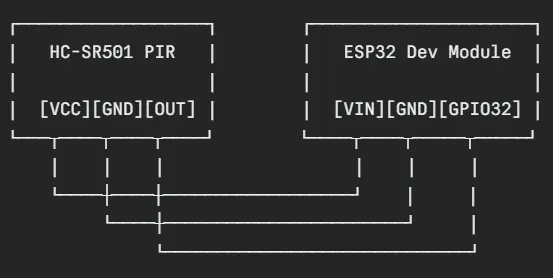
HC-SR501 Sensitivity Adjustment:The PIR sensor has two small orange potentiometers on the back:
- Left pot — Sensitivity (turn clockwise = more sensitive, detects farther)
- Right pot — Delay time (turn counterclockwise = minimum hold time ~3 seconds)

For this project, set delay to minimum so the firmware debounces handles timing.
Step 3 — Configure the Code
Download the full sketch from this project. Before uploading, change these lines at the top to match your network:
const char* ssid = "YOUR_WIFI_NAME";
const char* password = "YOUR_WIFI_PASSWORD";
Also update the static IP to match your router's subnet if needed:
IPAddress local_IP(192, 168, 1, 11); // Change last number freely
IPAddress gateway(192, 168, 1, 1); // Usually your router IP
IPAddress subnet(255, 255, 255, 0);
Step 4 — Understanding the Code
Here's a quick breakdown of how everything works.
Motion Detection Loop
int sensor = digitalRead(PIR_SENSOR_OUTPUT_PIN);
if (sensor == HIGH && !motionState &&
(now - lastMotionMillis > MOTION_DEBOUNCE_MS)) {
// New motion event — log it, increment counter
motionCount++;
lastMotionTime = timeClient.getFormattedTime();
hourlyMotion[hour]++;
motionHistory[historyIndex] = lastMotionTime;
digitalWrite(LED_PIN, HIGH);
motionState = true;
}
The 2-second debounce (MOTION_DEBOUNCE_MS = 2000) prevents one person walking past from registering as 10 events. The sensor output stays HIGH for several seconds naturally — the debounce ensures we only count one event per entry.
NTP Time SyncThe ESP32 syncs time with pool.ntp.org using IST offset (19800 seconds = UTC+5:30). Every detection is timestamped with real clock time, not uptime milliseconds.
Web Server Routes
/ → Full dashboard HTML
/motion → "No Motion" or "Motion Detected at HH:MM:SS"
/count → Total motion count
/hourly → JSON array of 24 hourly counts
/historyjson → JSON array of last 10 event timestamps
/signal → WiFi signal quality 0–100
/uptime → "Xh Xm Xs"
/reset → Clears all data
he dashboard polls these endpoints every 2 seconds using fetch() — no page reloads, pure AJAX.
Threat Level EngineThe dashboard automatically calculates threat level based on motion count and current state:
- LOW — Fewer than 5 events, no active motion
- MEDIUM — 5–15 events
- HIGH — 15+ events or active motion
- CRITICAL — Active motion + 20+ events (flashing red)
Step 5 — Upload & Test
- Connect ESP32 to PC via USB
- Select correct COM port in Arduino IDE
- Click Upload (→ arrow button)
- Wait for "Hard resetting via RTS pin..." message
- Open Serial Monitor at 115200 baud
- You should see:

- Open that IP in your browser on the same WiFi network
- Wave your hand in front of the PIR sensor
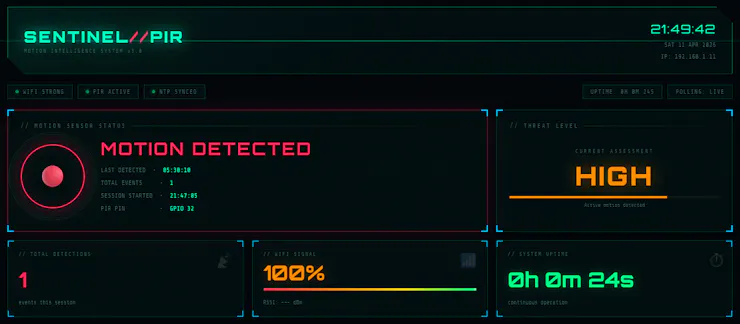
- Watch the dashboard go RED in real time
Step 6 — The SENTINEL Dashboard
Once running, open http://192.168.1.11 (or your configured IP) on any device on your WiFi. Here's what you get:

- Header — Shows device name, live IST clock, IP address
- Motion Orb — Large animated circle that pulses red when motion is detected and glows green when clear. Three expanding ring animations make it feel alive.
- Threat Level Panel — AUTO-calculates LOW / MEDIUM / HIGH / CRITICAL with color-coded display and animated fill bar
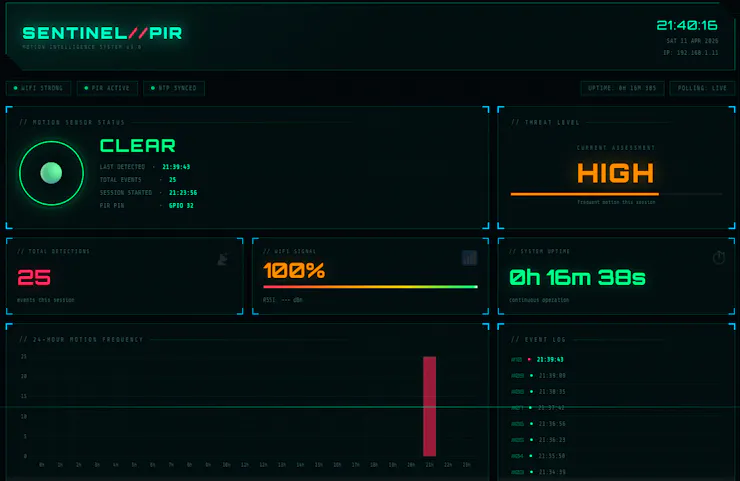
- Stat Cards — Total detections, Wi-Fi signal with gradient gauge, system uptime
- 24-Hour Bar Chart — Bars color-shift from green to yellow to red based on activity intensity per hour
- Activity Heatmap — 24 cells representing each hour of the day, heat-colored based on detection frequency. Hover each cell for exact count.
- 60-Minute Line Chart — Real-time minute-by-minute activity graph
- Event Log — Last 10 motion events with timestamps, newest highlighted in cyan
- Network Panel — All device details + Reset and Export buttons
Step 7 — JUSTWAY 3D Print Enclosure
A bare ESP32 and PIR sensor sitting on a desk looks like a prototype forever. I sent the design to JUSTWAY 3D Print, and the result transformed this project into something that looks genuinely professional.

If you're building any electronics project and want it to look like a real product, JUSTWAY 3D Print is the place to go. They handle everything from single prototypes to small production runs with fast turnaround and quality that's hard to beat locally.
Why JUSTWAY for maker projects:
- ✅ Custom enclosure design support
- ✅ Multiple material options — PLA, PETG, ABS
- ✅ Tight tolerances for PCB/component fits
- ✅ Affordable prototype pricing — no minimum order
- ✅ They understand maker and IoT projects
For this SENTINEL enclosure,

the PIR dome sits perfectly flush in the cutout, the USB port aligns exactly,

and the whole unit sits cleanly on a shelf or mounts to a wall. Zero hot glue. Zero mess.

Conclusion

Building the SENTINEL PIR Motion Detector taught me that IoT projects don't have to stop at blinking LEDs. With an ESP32, a ₹150 PIR sensor, and a few hundred lines of code, you can have a fully functional, data-rich security monitor running on your local network — no cloud, no monthly fees, no privacy concerns.
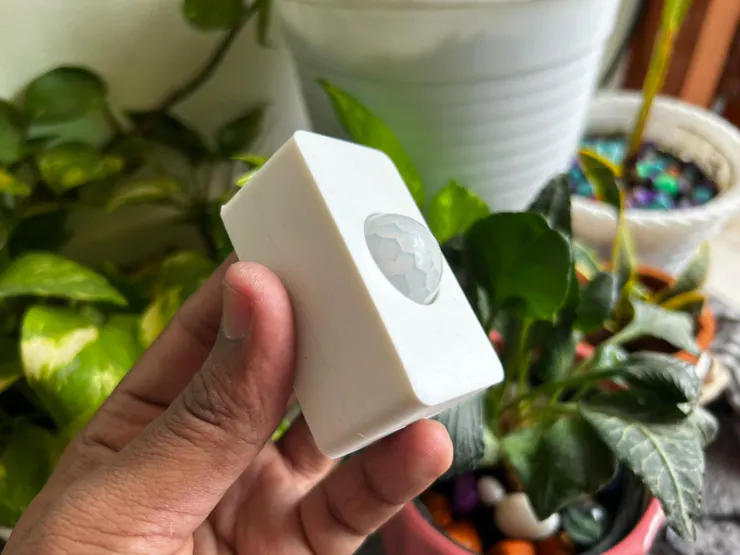
The JUSTWAY 3D Print enclosure was the final piece that elevated this from a weekend experiment to something I'm genuinely proud to have mounted on my wall. A good enclosure isn't just cosmetic — it protects the components, positions the PIR sensor correctly, and signals that the builder took the project seriously. If you're in Tamil Nadu and skipping the enclosure step on your projects, you're leaving the best part on the table.
Now go build it — and when someone asks what that glowing thing on your wall is, tell them it's your SENTINEL.