

The story
I feel like I missed an era.
Somewhere between my parents' shoeboxes of prints and the phone in my pocket, photography stopped being an event. Today's cameras are incredible: they fix your exposure, sharpen your faces, stack ten frames into one and hand you a perfect picture in a millisecond. And I scroll past thousands of perfect pictures without feeling anything.
Every time I go through my family's old photo album, I get this special nostalgic feeling and suddenly life feels worth living again, my father loved taking a lot of pictures from his youth and from back when we were young and they're all printed and kept safe, I take every chance I get to look at them and wish I could relive the moments :) Old photos feel different. The colours drift warm. The corners fall into shadow. There's grain, a light leak across the first frame of the roll, an orange date stamp burned into the corner, '98 9 24. They have character, and they came with a ritual: you loaded a roll, you had 24 shots, you wound the film by hand after every one, and then you waited to see what you got. Every frame cost something, so every frame meant something.
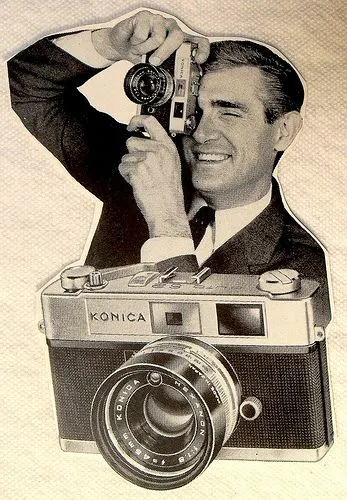
I wanted that feeling back. Not a filter on a phone app: a real object you hold, with a wheel under your thumb that clicks as you wind, a shutter that locks until you do, and a darkroom where your print slowly comes up under a red safelight.
So I built one. I called it Afterglow. Technology doesn't have to chase perfection. Sometimes the best thing it can do is bring back a feeling.


What it does
Afterglow is a two-mode camera, photo and cine, built around the ritual of old cameras.
Photo mode
Six film stocks on a little film shelf of pixel-art canisters, with a live preview of each look before you load it:
A viewfinder that shows the film look live, with grain and vignette. On top of that:
- a frame counter that rolls like a mechanical dial
- a light-meter needle and shutter speed from the light sensor, with a blinking SHAKE warning in low light
- a spirit-level line from the accelerometer
- A viewfinder that shows the film look live, with grain and vignette. On top of that:a frame counter that rolls like a mechanical diala light-meter needle and shutter speed from the light sensor, with a blinking SHAKE warning in low lighta spirit-level line from the accelerometer
- 24-exposure rolls (12 or 36 if you prefer), wound by thumb. After each shot the shutter locks. Roll the knob: click, click, click, click, clunk, and the next frame slides into the gate. At the end of the roll you crank it back by turning the other way.
- A darkroom. Each print comes up in a tray under a red safelight, darks first, with the liquid gently rippling. Then the lights come on.
- Instant packs of 10 with a counter that counts down. The print ejects from the top of the screen and develops out of a blue-grey haze.

Extras:
- an orange seven-segment date stamp
- a self-timer with blinking LEDs
- a flash, complete with the rising whine of a charging capacitor
- exposure compensation
- an "easy winding" setting for people in a hurry
Cine mode
Six looks, recorded as MJPEG .AVI files:
Look
What it does
Sound comes from the built-in mics. Clips play on a computer or back on the camera itself.
Album and Wi-Fi
- The album is a contact strip of film with orange edge printing. Scroll it, open a photo full-screen or play a clip, and delete (it asks first).
Wi-Fi transfer:
- No router needed: the camera becomes its own Wi-Fi network.
- Connect by QR code: scan the code on screen to join, and a second one opens the gallery in your phone's browser.
- Save to your phone: view any photo or clip and save it.
- Sets the clock: opening the page sends your phone's time to the camera, which matters because the K10 has no clock battery.
- Wi-Fi transfer:No router needed: the camera becomes its own Wi-Fi network.Connect by QR code: scan the code on screen to join, and a second one opens the gallery in your phone's browser.Save to your phone: view any photo or clip and save it.(Most phones cannot play avi video files)Sets the clock: opening the page sends your phone's time to the camera, which matters because the K10 has no clock battery.
Why the UNIHIKER K10
Buy it from the official store: DFROBOT
A camera needs a lot of parts, and the K10 has nearly all of them on one board:

- - ESP32-S3 with 8 MB of PSRAM, plenty to hold full-resolution frames.
- - GC2145 2 MP camera
- - 2.8" 240×320 display
- - Two microphones and a speaker, for shutter sounds, a film-wind ratchet and video with audio.
- - microSD slot for photos and clips.
- - Accelerometer and ambient light sensor, which became the level line and the light meter.
- - 3 RGB LEDs, for the self-timer, the recording light and the developing glow.
- - Battery connector, so it can go outside.
That left only the controls and the flash to add.
Designing the experience first
Before writing any firmware, I built a clickable web mockup of the whole camera, drawn at the K10's exact 320×240 resolution with the same pixel font the firmware would use. It had the film looks, the winding, the darkroom, the sounds and the menus. It let me decide how everything should feel before committing to C++, and it became the spec. The pixel font on the real camera was generated straight from the mockup's code.


A few rules came out of it:
- - Don't copy a smartphone. No touch, no endless menus. One knob.
- - Turn the hardware's limits into features. The sensor is soft and noisy, which is perfect for grain. Saving a JPEG takes about 1.5 s, so that's what the darkroom animation covers. Video tops out below 20 fps, and Super 8 ran at 18 anyway.
- - Every action should have a sound. Mechanical cameras were noisy, and the noise was half the fun.
Hardware and connections

The K10's own A and B buttons still work as a backup, but the main control is a KY-040 rotary encoder. One knob does everything:

Encoder wiring
The encoder's rotation needs real ESP32 pins, so it can use the chip's hardware pulse counter and never miss a click. On the K10's edge connector only P0 (GPIO1) and P1 (GPIO2) are native pins; everything else goes through an I/O expander. The push switch doesn't need speed, so it goes on an expander pin.

KY-040 connection to K10
- - CLK to P0 (GPIO1)
- - DT to P1 (GPIO2)
- - SW to P2, plus a 10 kΩ pull-up to 3V3
- - + to 3V3 (not 5 V!)
- - GND to GND

⚠️ Don't skip the 10 kΩ pull-up on SW. Without it the pin floats and the camera sees phantom presses.
Flash wiring
The flash LED goes on edge P8. It's an expander pin, so it drives a transistor rather than the LED itself
If you only have 3.3 V, use a 10 Ω resistor and expect a softer light. The 10 kΩ from base to GND keeps the flash off while the camera boots.
Power: TP4056 and a slide switch
The K10 has a battery connector but no charger, so I added a TP4056 module with USB-C and battery protection, plus a slide switch for on/off:
LiPo + ── TP4056 B+ TP4056 OUT+ ── slide switch ── K10 battery +
LiPo − ── TP4056 B− TP4056 OUT− ──────────────── K10 battery −
The TP4056's USB-C port is the charging port on the case. The K10's own USB-C is still used for flashing firmware.
[PHOTO: wiring close-up][IMAGE: wiring diagram]
The firmware
The firmware is written from scratch in PlatformIO (Arduino core 3.x on ESP-IDF 5), without the vendor's closed library.
Find the firmware on my github: Repository link
Getting a frame to the screen
- - Capture: the camera delivers a frame into PSRAM.
- - Rotate: the sensor sits a quarter turn from the way you hold the camera, so each frame is rotated in - software and cropped to landscape.
- - Film look: each film stock is a 65, 536-entry lookup table covering every possible screen colour, pre-computed with that film's tone curve, saturation, tints and fade. Applying a film costs one memory lookup per pixel. Grain and vignette go on in the same pass.
- - Overlay: the viewfinder is drawn with the pixel font and seven-segment digits.
- - Display: the frame goes out to the ILI9341 over SPI through small DMA buffers.
Taking a photo
- - The shutter: pressing it plays the first curtain click and blacks out the screen.
The capture task (on the second core):
- - Restarts the sensor at full 1600×1200.
- - Grabs the frame and plays the second curtain click.
- - Rotates and crops it to 1200×900.
- - Applies the film and date stamp.
- - Saves a JPEG to the SD card.
- - The capture task (on the second core):Restarts the sensor at full 1600×1200.Grabs the frame and plays the second curtain click.Rotates and crops it to 1200×900.Applies the film and date stamp.Saves a JPEG to the SD card.
- - Meanwhile, the main core animates the darkroom. The ~1.6 s shutter lag became a feature: it feels like a slow exposure.
- Getting exposure right outdoors was the trickiest part (see testing below).
Sound
Every sound is synthesised on the fly: filtered noise bursts, pitch-swept thunks, tones and a small motor model.
- - Shutter: first and second curtain clicks.
- - Film: the ratchet click of each wind detent, plus the clunk when the frame locks into place.
- - Rewind: the crank clicks and the rewind motor.
- - Flash: the charging whine.
- - Power-on: the chime.
A dedicated task plays them, so sound never stalls the screen.
Cine mode
Each frame gets its look and effects baked in, then:
- - Encoding: a task running on whichever core is free encodes it as MJPEG into a standard AVI.
- - Sound: a mic task adds 16 kHz audio alongside.
- - Sync: when you stop, the real frame rate is written into the file header, so picture and sound stay in sync.
Wi-Fi transfer
- Settings → Wi-Fi Transfer pauses the camera, frees its memory for the radio, and starts:
- - A Wi-Fi network named AFTERGLOW-XXXX.
- - A small web server that serves the gallery page, a list of photos and clips, BMP thumbnails built from the album's raw copies, and the files themselves.
- - Clock setting: the page sends the phone's time and time zone to the camera.


Everything survives power-off
The roll (film, frame number, whether you've wound on), settings and Super 8 cartridge footage are saved to flash. Turn the camera off mid-roll and it picks up exactly where you left off.
Testing and calibration
The K10 wasn't designed to be a camera, and getting it there took some detective work. A bring-up screen (hold A at power-on) tests every part with live readouts, which made each problem quick to find.
- - Garbled screen. The display ignored its landscape (row/column swap) command. Fix: keep the panel in portrait mode and rotate each frame in software.
- - Scratchy image. The camera clock was too fast. Fix: at 10 MHz it's clean; at 16 MHz it isn't.
- - Sideways picture. The sensor is mounted a quarter turn off, and its own flip settings do nothing. Fix: rotation happens in software.
- - Static in recordings. Too much of the mic gain came from the ADC's digital stage, which amplifies its own noise. Fix: +24 dB analog and +12 dB digital is clean.
- - Viewfinder narrower than the photos. The driver only reads the centre of the sensor for small frames. Fix: the custom sensor window.
- White outdoor photos. Restarting the sensor for a full-resolution photo resets its auto-exposure, which then needs several slow frames to adapt. Writing the old exposure back didn't help, because the auto-exposure overwrites it.
- - Fix: turn the sensor's auto-exposure off for the photo frame and start from the viewfinder's exposure. The firmware then measures the actual frame's brightness and blown-out highlights, and corrects up to twice. In effect, a tiny auto-exposure of my own.
- - An EXPOSURE setting (−1 to +1 in half stops) handles taste.
- - White outdoor photos. Restarting the sensor for a full-resolution photo resets its auto-exposure, which then needs several slow frames to adapt. Writing the old exposure back didn't help, because the auto-exposure overwrites it.Fix: turn the sensor's auto-exposure off for the photo frame and start from the viewfinder's exposure. The firmware then measures the actual frame's brightness and blown-out highlights, and corrects up to twice. In effect, a tiny auto-exposure of my own.An EXPOSURE setting (−1 to +1 in half stops) handles taste.
- - Video framing. In cine mode you can choose WIDE (same view as the photos, slower) or SMOOTH (zoomed in, faster).
Case design
For the case, I took inspiration from the LK003. It isn't a vintage camera itself, but it borrows its look from the retro point-and-shoot cameras of the past, and I loved its multicolour design. Afterglow follows the same idea: a modern build that feels like it came out of an old camera bag.
I designed everything from scratch in Autodesk Fusion 360.

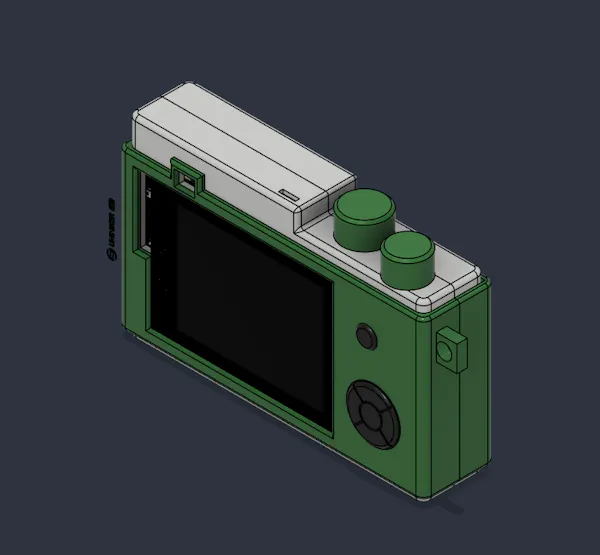
One rule guided the whole design: no screws, anywhere. Every joint is either a snap fit or a part designed to be glued, which makes assembly easier and means fewer parts to buy.
Every opening is designed around the hardware inside:
- - the camera window
- - the flash window
- - the screen
- - the USB-C charging port (TP4056)
- - the power slide switch
- - the encoder knob
Download the (stl)3D Files Here
3D printing
I printed everything in PETG:
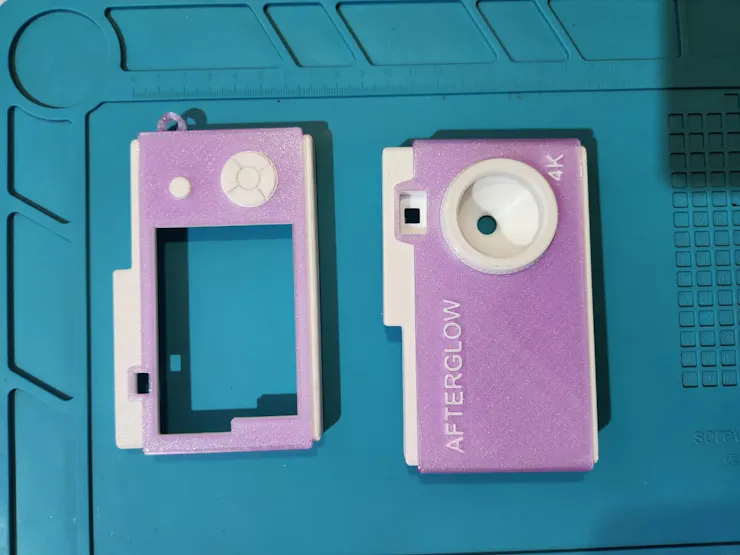
- - White for the main body.
- - Translucent purple for the coloured panels and the encoder knob.
The translucent purple against the white gives it a much finer, more finished look than a single colour would.


Assembly
Because the case uses snap fits and glue, assembly goes quickly:

- - Wire the power path: LiPo → TP4056 → slide switch → K10 battery connector. Test charging and power on/off before closing anything.
- - Wire the KY-040 to P0, P1, P2, 3V3 and GND, with the 10 kΩ pull-up on SW.
- - Build the flash: solder the transistor circuit and fit the LED into its slot.
- - Seat the K10: line up the camera and screen with their openings.
- - Fit the TP4056 and the switch into their slots, so the USB-C port and the switch line up with the case.
- - Mount the encoder and press on the purple knob.
- - Close the case: snap the shells together and glue the parts designed to be glued.
- - Insert a FAT32 microSD card.

Flashing the firmware
- - Install VS Code with the PlatformIO extension.
- - Clone https://github.com/tech-nickk2/DIY-Retro-Camera-Afterglow-using-UNIHIKERK10
- - Connect the K10 over its own USB-C and run:
pio run -t upload
- - If the upload doesn't start: hold BOOT, tap RST, release BOOT.
- - First boot:Hold A at power-on to open the bring-up screen and check everything shows OK.Then turn on Settings → Wi-Fi Transfer, connect your phone, and open the page. The camera's clock sets itself.
If a build ever fails with stdint.h: No such file or directory, the compiler download was interrupted. Delete ~/.platformio/packages/toolchain-xtensa-esp-elf and build again.

Demo
This is hands down my favourite build so far.

The camera looks so good, and holding it feels like a real camera. The UI is amazing: the rolling counter, the film shelf, the darkroom. The sounds make every click feel mechanical. The display brings it all to life, and the photos come out looking genuinely vintage. Best of all, it brought together everything I love doing: firmware and design.
What's next
- Improve the case design, and make the whole camera more robust.
- Keep improving the firmware.
- Add a real lens to the camera.
My Final takes from this
Phones made photography effortless, and somewhere along the way they made it forgettable. Afterglow is the opposite on purpose: slow, a little stubborn, noisy and full of character. It makes you wind the film. It makes you wait for the print. It gives you 24 shots and asks you to make them count.
Build one, load a roll, and go outside. 📷
Let this be an inspiration for you to appreciate technology and art. I would appreciate your thoughts about this project in the comets. If you build one let me know how it goes :)